Back in August, we announced a new Partner API (BETA). In September, we launched our Phase 1 and in October our Phase 2 MCP Connector (BETA).
Today, we are happy to announce Phase 3 of our MCP Connector (BETA).
This update is about the first week of a customer's life with us: the settings an onboarding engineer walks through for every new system, one page of the management console at a time. They are now part of the conversation, and of the Partner API, so an onboarding checklist can be applied to a new system in minutes, or scripted and applied the same way to every system you deploy.
In one sentence: tell your assistant how the new system should be set up (who the operator is, when it may reboot, where recordings are archived, which countries may be called, what happens when someone dials an emergency number) and it reads the current settings, changes only what you asked, confirms with you before anything destructive, and reads the result back.

Why these settings
We started from the onboarding team's New Client Checklist. Its critical tab lists nine things that must be right before a customer goes live. Seven of them were already reachable through the connector; two were not (the reboot schedule could only be read, and the operator could only be set by a raw parameter write that we hold back from partners). The table shows where each item stands now.
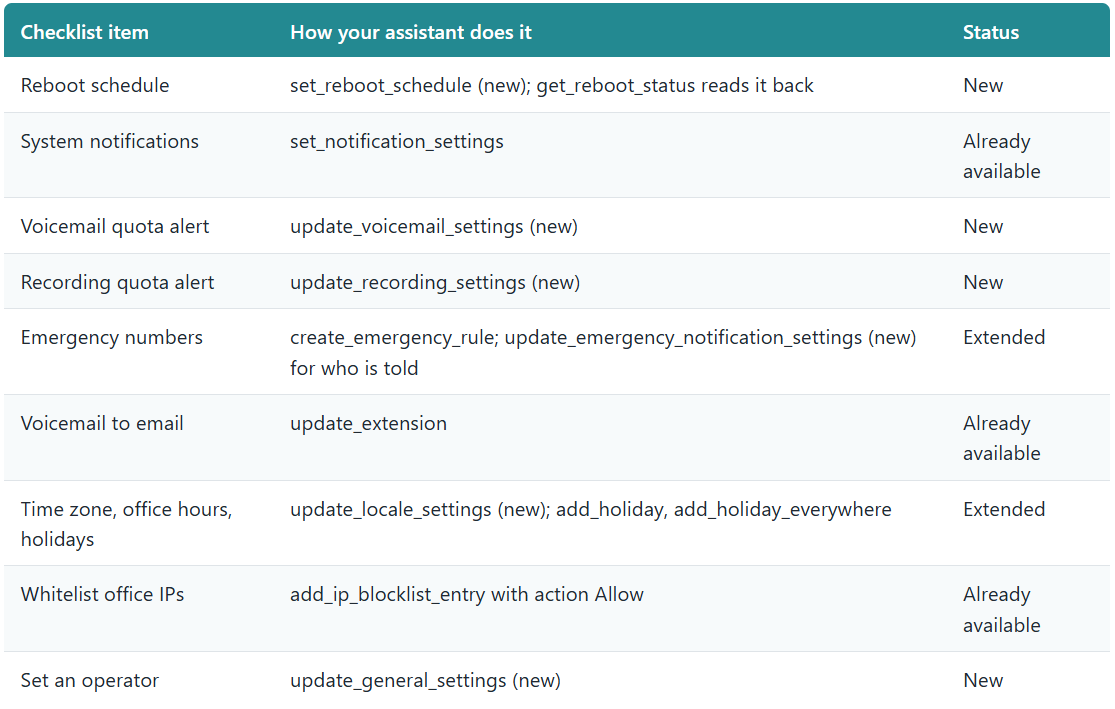
Having the checklist covered, we went on to every other system-wide setting a new customer is asked about in the first week: storage, archiving, dialing behavior, number formatting, the clock and the language.
What is new
General settings and the reboot schedule
- Operator extension and the call-handling switches around it, the busy monitor, hot-desking auto-logout and the scheduled report time. The operator is checked to exist before it is set.
- Reboot schedule as a typed setting: none, daily, weekly or monthly, with the day and time; the status read reports it the same way.
Voicemail and recording storage
- Voicemail: quota, the alert threshold, automatic deletion and the transcription engine. A transcription key is written but never read back: the settings report only that one is configured.
- Recordings: quota, the alert threshold, automatic deletion and retention.
Remote archive
- Where recordings, voicemails, faxes and chats are archived (SFTP, a network share or Google Cloud Storage), the schedule, and what is included. Passwords and keys are write-only. Only the fields you send change, so turning a schedule on does not disturb the location or the credentials already there.
Dialing behavior
- Dial codes: the thirteen feature codes users dial (park, pickup, intercom, hot desking and the rest), each validated and checked for clashes before anything is written.
- Call parking: how many parking slots, which hold music parked callers hear, and whether and where a parked call is picked up automatically when the timeout passes.
- Allowed countries: every country the system knows with whether calls to it are allowed. Allow or block by country name (all of its dial codes) or by a single dial code, or allow a list and block everything else. The assistant works in countries; it never has to compute a list of 260 codes.
- Number formatting (E.164): the home country and how national, international and area codes are handled.
- Time zone and language: the time zone as an everyday name such as America/New_York, matched to the one the phone system uses, and the language of prompts and emails.
Emergency notifications
- What happens when someone dials an emergency number: who is messaged in chat (the caller's department managers, the whole department, or every department's managers), which extension, queue or ring group is called with an announcement, and which email addresses are notified. The destination and the announcement are checked to exist before the change is made.
Two small lookups
- get_did answers one direct-dial number and where it routes; get_blocked_number answers whether one caller number is blocked and why. Both existed as lists; now a single number can be asked about directly.
How every change behaves
- Only the fields you send change. Every settings update is partial: a field you leave out keeps its current value, and an empty value is the explicit way to clear something.
- Validated before anything is written. Each field is checked by name against the phone system's own rules, and where a value must exist (an operator, a prompt, a destination, a country) it is looked up first. A refusal names the field; nothing is half-applied.
- Confirmation first. Every change is a destructive tool in the connector's terms: the assistant describes what it is about to do and waits for your yes.
- Read back. The answer to every change is the settings as the phone system holds them afterwards, not an echo of the request.
- Audited. Each change lands in the phone system's own audit log under the name of the API key that made it, like every other write through the connector.
Who gets it

The Operations profile is unchanged: it stays focused on the live running of a system (calls, queues, services, reboots). Configuration belongs to the full-access profile and to keys that carry it.
What is not in this update
- Microsoft Teams Direct Routing stays in the Control Portal. Setting it up needs DNS records on our side as well as changes on the phone system and in the customer's Microsoft tenant, and that chain is not something we want an assistant or a script to run unattended.
Getting started
The update reaches every partner account in every region with the November release. If your assistant was connected before the release, reconnect it once so it picks up the new tools; a new connection has them from the start. The connection guide and the API documentation are updated with it.