Locating the Partner Name
- Login to the 1Stream phone system.
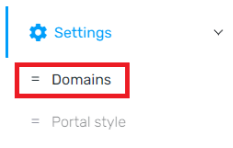
- Scroll down to the Settings menu.
- Select the Domains option.
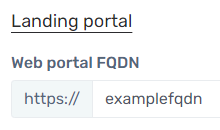
- The company name will be visible under the Web Portal FQDN section.
I can't login and don't know my Company ID
You should be able to find your Company ID in your initial sign-up communications with 1Stream.
Otherwise, please reach out to our support team and we can assist you in locating that information.
Can I change my Company ID?
Absolutely. Follow our article Changing the Control Portal Subdomain, and that will change the ID users need to enter whenever prompted for a Company ID.